This is the fourth time in less than one year that I’ve had trouble installing a WinRE update. I am most definitely cursed.
A quick rundown, because I don’t know what might be relevant info at this point:
Last August, I re-imaged my system drive using Acronis True Image, which nuked my original recovery partition; after manually recreating it, a couple WinRE updates refused to install, until Ramesh Srinivasan kindly helped me get them working.
Then in January, WinRE security update KB5068164 refused to install due to insufficient free space in the recovery partition. Ramesh walked me through expanding and updating it manually – my thanks again.
Then in April, WinRE update KB5087371 refused to install. The site’s AI answer suggested that a WinRE image that had been manually updated (as was the case with mine) can cause the update to fail, and that my WinRE image version indicated the update wasn’t necessary anyway, and that if I ignored the update a subsequent Windows cumulative update would remove it from the update queue, which it did. I figured things might finally be settled.
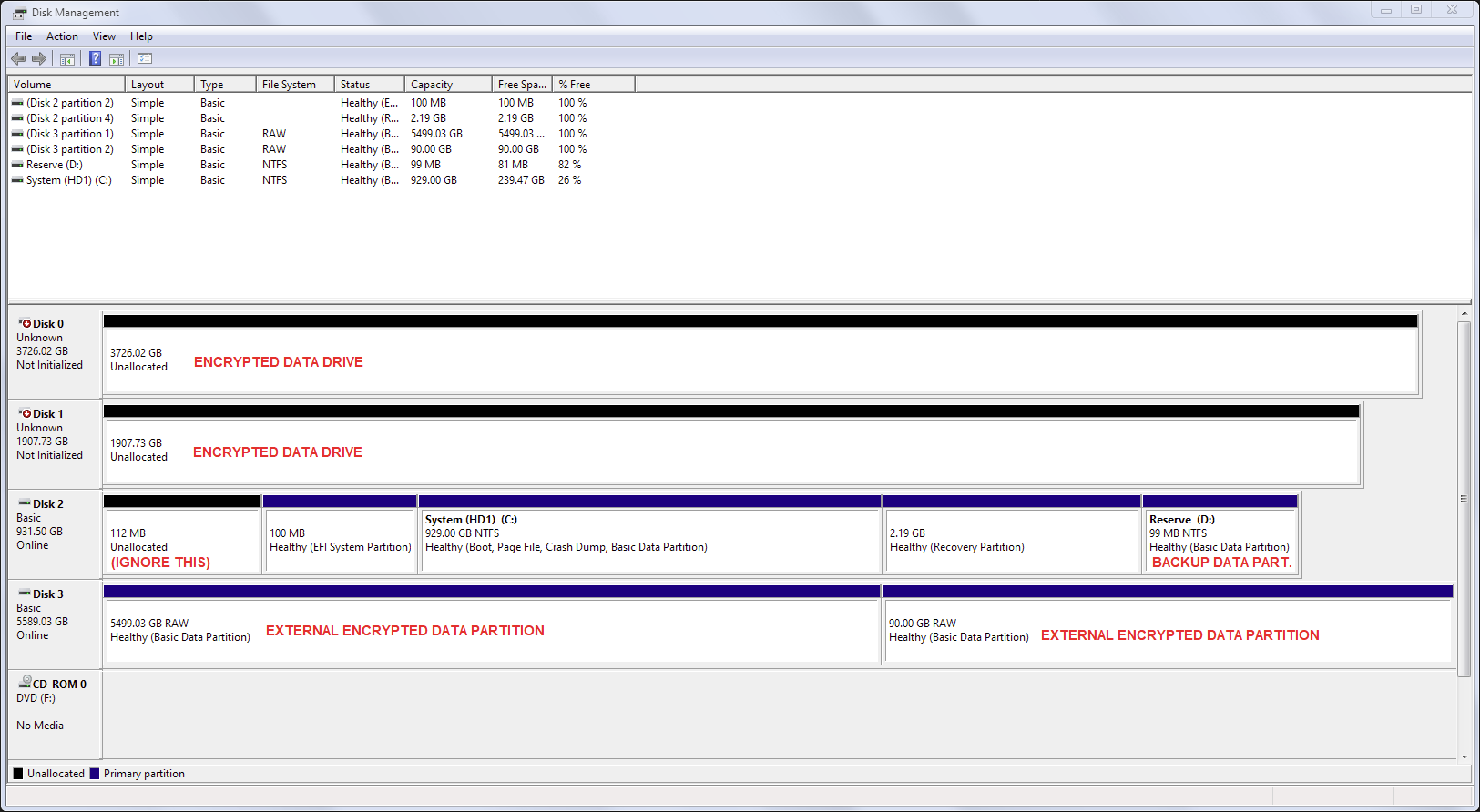
Well, another WinRE update is here, and guess what’s back? This time it’s WinRE update KB5098815, and once again it’s failing to install with an unspecified error. Out of an abundance of caution, I went ahead and doubled the recovery partition size to 2 GB (using the instructions in this guide), just to make extremely sure it isn’t failing to update due to insufficient space, but it is still failing. (I also used this other guide to solve the “Windows RE image was not found” error I received when trying to re-enable WinRE after following the first guide.)
Disk Management:
Command Prompt readout showing reagentc /info, recovery partition free space (1.7 GB), and System32\Recovery directory contents:
Microsoft Windows [Version 10.0.19045.7417]
(c) Microsoft Corporation. All rights reserved.

C:\Windows\system32>reagentc /info
Windows Recovery Environment (Windows RE) and system reset configuration
Information:

    Windows RE status:         Enabled
    Windows RE location:       \\?\GLOBALROOT\device\harddisk2\partition4\Recovery\WindowsRE
    Boot Configuration Data (BCD) identifier: ac6d8549-f2bf-11f0-bd8a-401c83cf49bd
    Recovery image location:
    Recovery image index:      0
    Custom image location:
    Custom image index:        0

REAGENTC.EXE: Operation Successful.


C:\Windows\system32>fsutil volume diskfree \\?\GLOBALROOT\device\harddisk2\partition4\Recovery\WindowsRE
Total free bytes        : 1,862,246,400 (1.7 GB)
Total bytes             : 2,348,806,144 (2.2 GB)
Total quota free bytes  : 1,862,246,400 (1.7 GB)

C:\Windows\system32>dir c:\windows\system32\recovery /a
 Volume in drive C is System (HD1)
 Volume Serial Number is FA7B-E6ED

 Directory of c:\windows\system32\recovery

06/11/2026  03:07    <DIR>          .
06/11/2026  03:07    <DIR>          ..
06/11/2026  03:04             1,109 ReAgent.xml
12/03/2023  22:37       466,404,365 Winre.wim
               2 File(s)    466,405,474 bytes
               2 Dir(s)  257,129,537,536 bytes free
(I’d provide a link to a ZIP archive containing my System32\Recovery files, but the last time I added that to a post in a previous thread the site’s daft filters kept auto-deleting my post, and I don’t wanna risk being forced to retype this whole post again.)
Once more, any assistance would be really appreciated. I would especially love it if we can make it so that WinRE updates normally via Windows Update once and for all.
' cx='32' cy='32' r='32' /%3E%3Ctext x='50%25' y='55%25' dominant-baseline='middle' text-anchor='middle' fill='%23FFF' %3EJ9%3C/text%3E%3C/svg%3E)


